Ultimate Desktop Simulator Online
Reviews
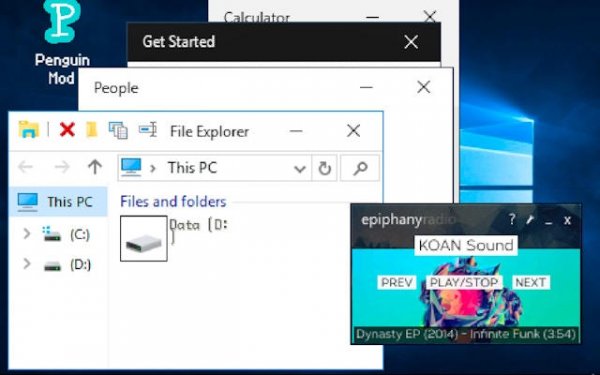
This game offers a surprisingly detailed recreation of the Windows 10 interface. The ability to run multiple apps simultaneously adds depth, while hidden easter eggs encourage repeated exploration. It is a clean, engaging experience that respects the original design. Ideal for learning or relaxing.
About This Game
Game Introduction
Ultimate Desktop Simulator Online is a browser-based simulation that recreates the look and feel of a modern operating system desktop. It offers an interactive environment where you can explore familiar interfaces, launch built-in applications, and experience the flow of a real computer workspace. The core objective is to enjoy a fully simulated desktop experience, from startup to shutdown, with authentic sounds and visuals. What makes this game unique is its attention to detail in mimicking a real OS, allowing you to experiment freely without any real-world consequences.
How to Play
Start by booting up the virtual desktop and navigating the interface using your mouse or touch input. Launch applications from the taskbar or start menu, such as a word processor, drawing tool, calculator, and file browser. You can run multiple programs at once, each maintaining its own state, just like on a real computer. Rearrange icons on the desktop, pin your favorite apps to the taskbar, and use the power menu to log out or shut down. Explore the system to discover hidden features and easter eggs that add to the fun.
Game Features
Realistic multitasking with multiple applications running simultaneously. High-quality built-in apps that function similarly to real software, including a word processor, paint program, calculator, and file explorer. Detailed system behaviors such as startup, login, and shutdown screens. Hidden discoveries and easter eggs scattered throughout the desktop. Multiplayer support allows for shared experiences, and the game may include options for modifications to personalize your desktop.
Tips for Success
Take your time to explore every corner of the desktop to find hidden surprises. Practice multitasking by opening several apps at once to get comfortable with the interface. Use the file explorer to organize your virtual files and understand how the system works. If you enjoy customization, look for any modification options to tailor the experience to your liking. Finally, share your discoveries with friends who also play to enhance the multiplayer aspect.
Compatibility:
✅ Works on PC & Mobile | Recommended: Chrome / Safari / Edge